How would I delete document metadata?

Hello,
I didn't realize the difference between documents and seeds, so I ended up adding metadata to a document that was already a seed.
The result is I have two seeds that display twice in my collection: https://archive-it.org/collections/17228 (Ironbound Community and Newark Preservation and Landmarks).
I tried uploading the document excel sheet blank -- but it didn't delete the metadata. Is there anyway to delete this doucment level metadata so I don't have dups?
-

Hello Nadine,
Can you take a fresh look at your public access page at your next convenience and just let me know if you still see the duplication issue? I think we've made the necessary tweak from here on our side so please let me know if you still see anything amiss!
https://archive-it.org/collections/17228
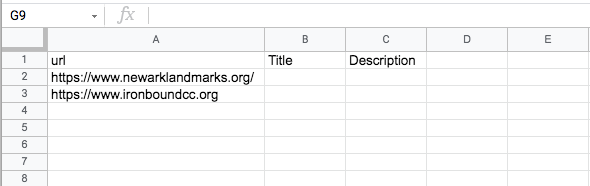
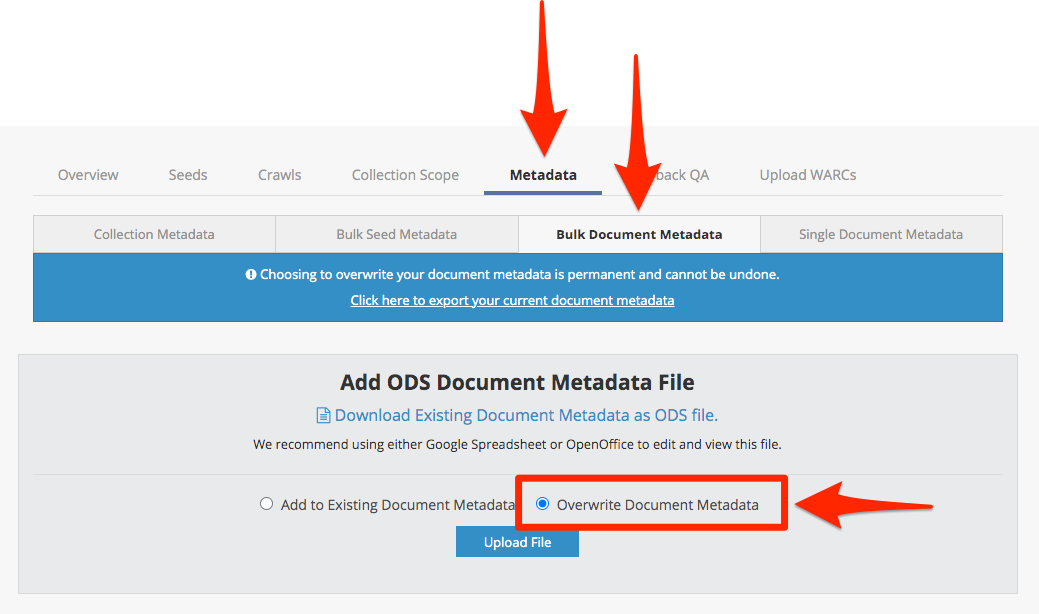
For those following along from home: this process can be finicky but Nadine's got the right idea. What you want to do is overwrite the duplicate document metadata with a spreadsheet of the relevant seed URLs and attributes with empty values.
1. Create an ODS spreadsheet file that includes the seed URLs and the precise metadata attributes that you want to remove/delete and just leave their values blank:
2. Upload this spreadsheet to the Bulk Document Metadata view in the Archive-It web application (and don't forget to click the "Overwrite Document Metadata" radio button):
Please sign in to leave a comment.
Comments
1 comment