
On this page:
- What are 'crawler traps' and why should we avoid them?
- How to identify a crawler trap
- What to look for in queued documents
- How to prevent traps from being crawled
What are 'crawler traps' and why should we avoid them?
A crawler trap is a set of web pages that create an infinite number of documents (URLs) for our crawler to find, meaning that such a crawl could infinitely keep running and finding "new" documents. Crawls have maximum time limits that will stop them after a certain length of time. These traps can still archive quite a lot of content prior to the time limit, so avoiding traps is a key part of effectively managing your time and your data budgets.
You can use the following information to help you identify crawler traps that may be a part of your scope, and to avoid crawling them in the future.
How to identify a crawler trap
To identify potential traps, view your crawl's Hosts report. Especially high numbers of "Queued" documents from any particular host can be an indication of a crawler trap.
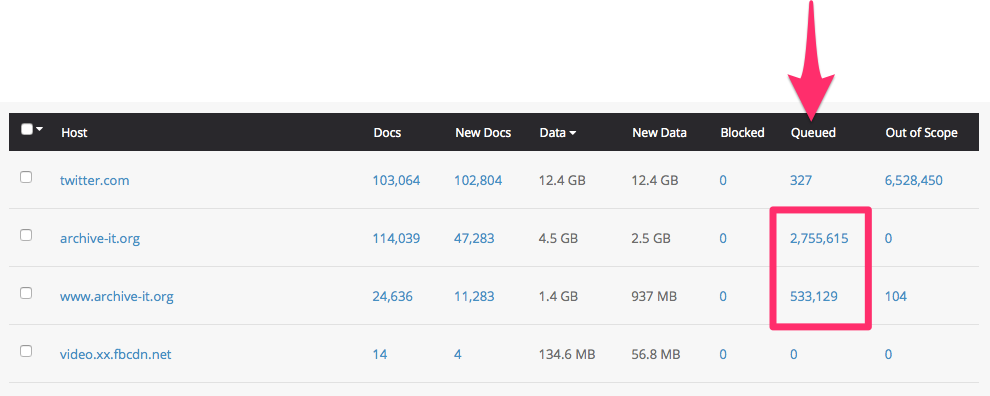
Click the hyperlinked number to view/download the list of queued documents. Review the document URLs to determine if they conform to a pattern that may potentially be crawled indefinitely (such as calendar dates or endlessly repeating or excessive directories) and therefore may be worth limiting in future crawls. If you are not sure whether the documents in the list are valid and valuable or not, copy/paste them into your browser to view them on the live web.
What to look for in queued documents
There are many types of crawler traps that you may encounter, such as wikis or forums containing infinite links for infinite types of viewing options, but we've identified a few of the more common ones. Before excluding specific patterns in like these, copy and paste a few examples into your browser to make sure they are invalid or unnecessary.
Long messy strings:
http://www.example.org/-4RKgHfoN-6E11VCLhJOgPe79POuU2ZXhnTVbnUg_Zs.eyJpbnN0YW5jZUlkIjoiMTNkZDNmOTYtZTE1OC03NTU5LTEyMWMtZmM1YzE3MmQxMzk4Iiwic2lnbkRhdGUiOivZGUiOmZhbHNlLCJiaVRva2VIy…
These are indicative of a site created using the Wix platform. We have some specific instructions for Archiving Wix Sites.
Repeating Directories:
http://www.example.org/media/media/page/sites/css/html-reset.css
-and-
Extra Directories:
http://www.example.org/media/feed/pae/sites/all/themes/dev/custom/sites/all/themes/enviro-c4/css/html-reset.css
In most cases, large numbers of repeating directories or extra directories are a strong indication of a crawler trap. To be sure, copy and paste one or two of these document URLs into your browser to confirm that they are invalid and do not resolve to desired content. We have developed a Regular Expression to help mitigate these invalid documents, which you can find in our Regular Expressions help article.
Calendars:
http://www.example.org/calendar/events?&page=1&mini=2015-09&mode=week&date=2021-12-04
Calendar pages are not always a problem, but have the potential to generate documents infinitely into the future and past. A regular expression for excluding all calendar content is available in our Regular Expressions help article. If you would like to capture only a specific date range, contact us and we can help develop a regular expression for your use case.
How to prevent traps from being crawled
If you identify any traps in your crawl's Hosts report, you can exclude them from future crawls by limiting the scope of your crawls. Most often, we recommend identifying a string of text that appears in all of the invalid/superfluous documents and then applying a rule to exclude those specific strings in future crawls:
However, we have also devised a few regular expressions for document URLs that generate infinitely without a single consistent string of text to be identified/excluded:
Comments
0 comments
Please sign in to leave a comment.