
Overview
We always recommend running a test crawl first when adding new seeds to a collection. This article provides instructions for running, monitoring, and reviewing test crawls. It also provides directions for saving or deleting test crawl data, best practices, and an overview of the test crawl data de-duplication process.
On this page:
- Why use test crawls
- Instructions
- Data de-duplication in test crawls
- Video tutorial on test crawls
- Related content
Why use test crawls
Unlike Production crawls, test crawls will not automatically add data or Wayback captures to your account. They need to be manually saved for the data to be applied. Because of this, whenever you create a new collection or add new seeds to an existing collection, we highly recommend running and evaluating a test crawl first before you permanently add new data to your Archive-It account.
Test crawls provide an accurate indication of how your seeds will crawl, archive, and replay before you expend any of your account's data budget. They allow you to review and plan for the crawl duration, scoping rules, and other factors that can make your future production crawls as successful and efficient as possible.
Instructions
How to run a test crawl
Once you have added a new seed(s) to a collection, you can run a test crawl to observe how they archive and replay and, if necessary, take steps to improve that process. To do so, follow the directions provided in our full guidance on launching one-time and test crawls from a seeds list. In the dialog box, remember to click Test Crawl as your Crawl Type.
Once you add new seeds to a collection, you can run a test crawl to see how they archive and replay, and then make any adjustments needed. Follow the steps in our full guide on running test and one‑time crawls rom a seeds list, and in the dialog box be sure to select Test Crawl as the Crawl Type.
Outcome
After selecting Test Crawl as the Crawl Type and adjusting any other crawl parameters, your test crawl will begin when the Crawl button is clicked.
How to monitor a test crawl in progress
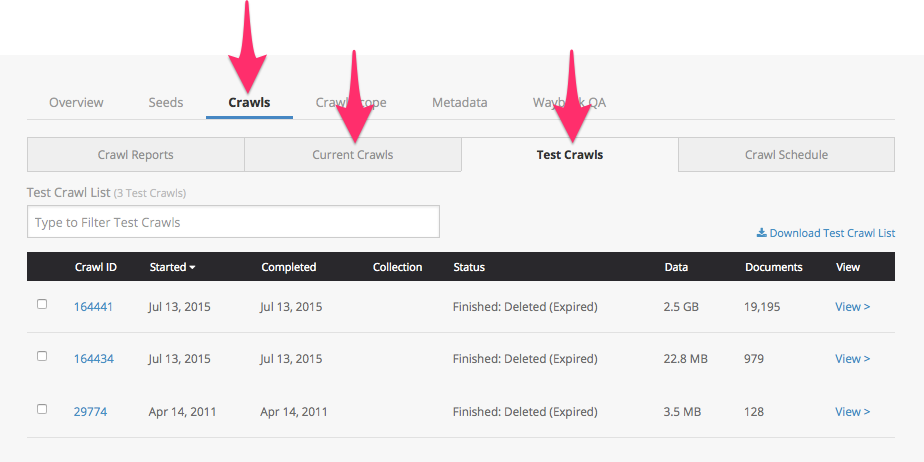
Once your new test crawl has started, you can monitor it from the Crawls sections of your account, or from the Current Crawls or Test Crawls lists under the given collection's Crawls tab.
To see a full crawl report for your test crawl as it runs, click the Crawl ID link from any of these lists.
How to review the results of a test crawl
How to read test crawl reports
Once your test crawl is complete, you can find the report in the Crawl Reports or Test Crawls lists in the given collection's Crawls tab.
Click the Crawl ID link from any of these lists to see your test crawl's reports. To read and interpret the information in these reports, consult our complete guidance on how to read your crawl's report.
How to resume a test crawl
Test Crawls that finish due to a time, data, or document limit can be resumed within 7 days of completion. For instructions on resuming a crawl, see How to resume a finished crawl.
How to browse test crawl results in Wayback
You can browse your crawl results in Wayback approximately 24 hours after your crawl completes. To do so, click the Wayback > link corresponding to each seed in your test crawl's Seeds report.
|
Note: Test crawl captures are stored separately from your permanent collection, giving you the chance to assess before either saving them permanently or deleting them. The only place you can view unsaved test crawl results in Wayback is via the Seeds tab of your test crawl report. |
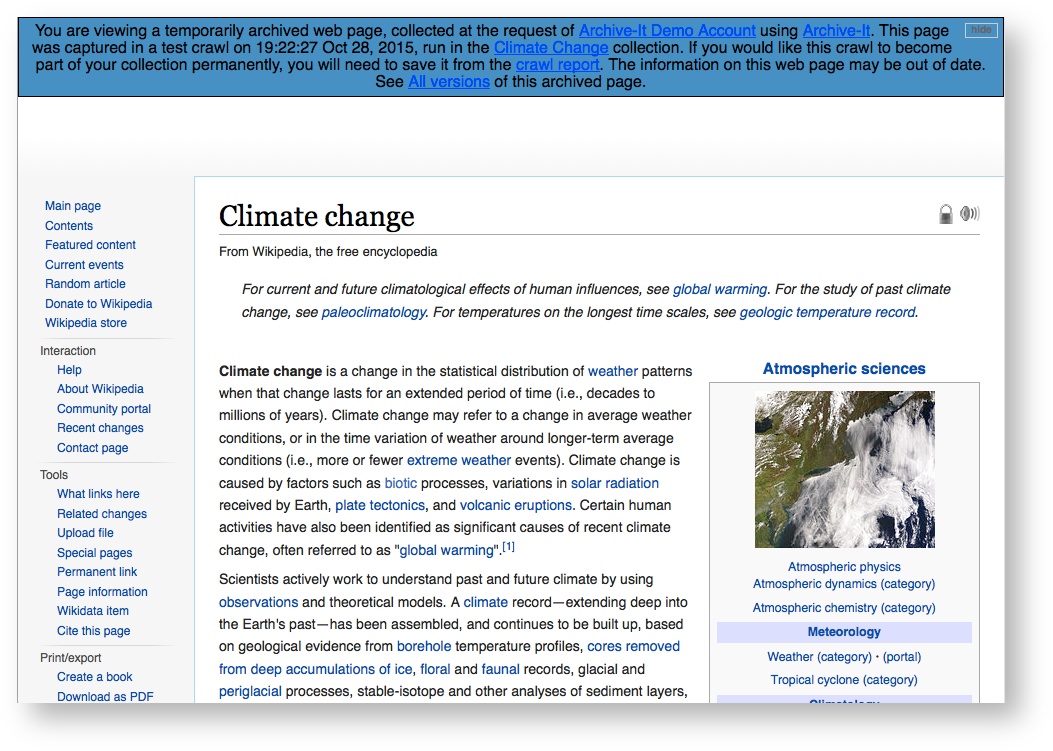
Wayback captures from unsaved Test crawls will have a blue banner at the top.
How to save or discard test crawl data
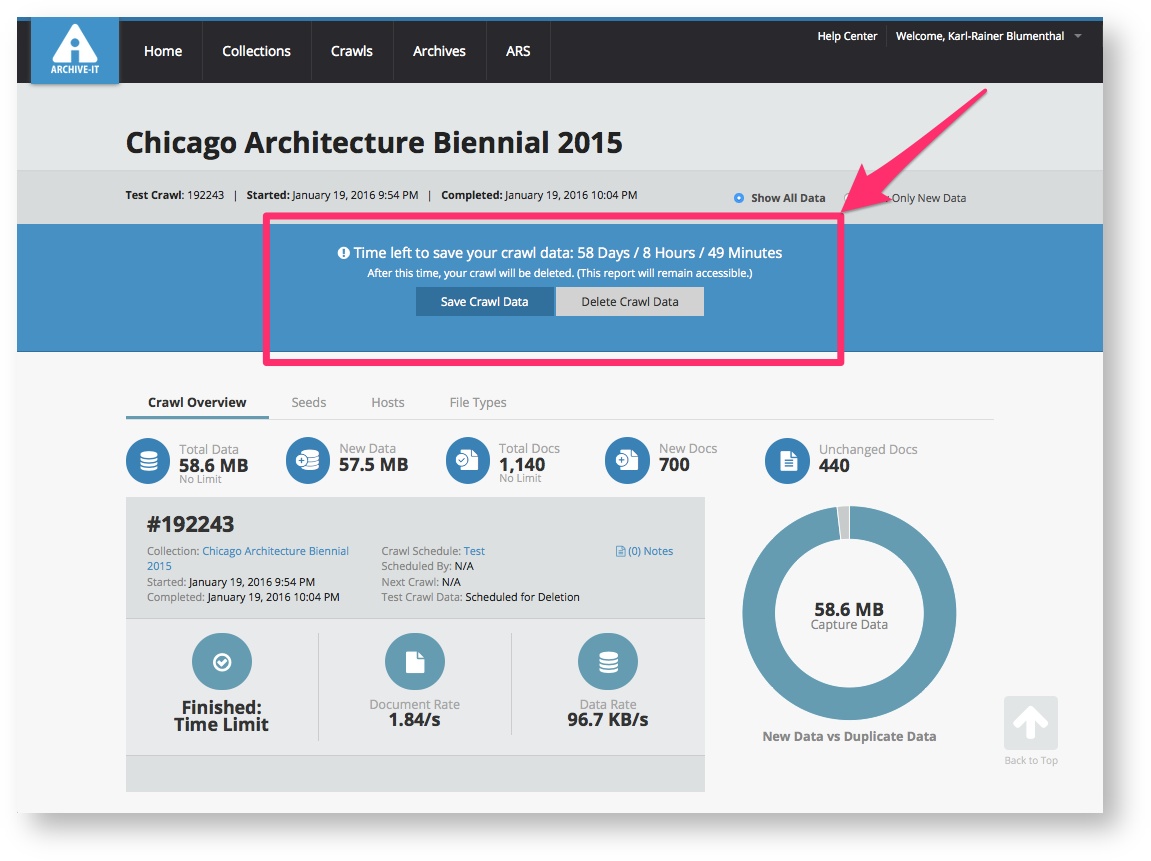
Test crawl data remains available for 60 days. After you review a completed test crawl, you can either save it to permanently add the captures to your collection or delete it if you want to adjust scoping and run another test. If you take no action, the captures will automatically expire and be removed from Wayback 60 days after completion, though the crawl report will still be accessible. Once a crawl is saved, it becomes part of your archived data and cannot be deleted.
When the crawl finishes, a banner will appear with options to save or delete the test crawl. This banner also shows how much time remains before the captures expire automatically.
| Tip: While the WARC data for any expired/deleted test crawl will no longer be available to browse in Wayback, the test crawl report data will remain available for your future reference. |
Why should I delete a test crawl rather than let it expire?
If you aren't satisfied with the results of a test crawl, we recommend deleting it and trying again rather than letting the crawl automatically expire after 60 days. This is because data captured in previous crawls can impact replay of content captured in future crawls and vice versa.
The goal of Wayback replay (both test and production) is to load complete pages whenever possible. It uses the timestamps and checksum values of archived documents in the CDX index to determine what to load, rather than looking at which crawl a document came from. This means that a document that was missing from test crawl A, but was captured in test crawl B, could potentially replay in captures from both crawls.
Data de-duplication in test crawls
Test crawls will de-duplicate against permanent data in your account, meaning any data captured via a production crawl (recurring or one-time) or saved test crawl. Test crawls do not de-duplicate against data captured in any unsaved test crawls.
Video tutorial on running test crawls
Related Content
How to manually start test and one-time crawls
How to crawl new seeds immediately with InstaCrawl
Comments
4 comments
When I go to the "Crawl Reports" and "Test Crawls" tab I do not have a column for "View"- the last one I see is "Docs." I'm having this issue on multiple browsers and wondering if the system has been updated or if I'm missing something.
Hi Amanda,
Thanks for catching this! The "View " column no longer exists in these crawl tables. You can instead click on the Crawl ID (in the lefthand column) directly to view both in progress and completed crawl reports. I've updated the article accordingly.
Related to the guidance on deleting a test crawl rather than letting it expire, does Archive-It recommend waiting a certain amount of time before initiating a re-crawl? Is the data related to a deleted crawl removed immediately?
Good question Christie! There might be a short processing delay between deleting test crawl data and seeing it removed from Wayback replay, but we do not advise waiting necessarily. Test crawls do not de-duplicate against one another, so it is safe to run a new test crawl immediately and not expect the prior test crawl to affect its results at crawl time.
Please sign in to leave a comment.