
Overview
Twitter is an online social networking service. This guide provides an overview of how to properly format, scope, and crawl Twitter seeds.
Known issues
Social media platforms like Twitter can be difficult to archive. Recent changes to the Twitter platform present multiple archiving challenges. Twitter is currently experiencing the following issues, which we continue to actively monitor:
- ⚠️ Archive-It can collect and replay Twitter feeds visible to non-logged-in users. This means recent captures may not include the latest tweets.
- ⚠️ For individual tweets that contain video, video can sometimes be replayed through the Wayback banner.
For a full list of known issues please visit our Status of monitored platforms page.
On this page:
- How to select and format your Twitter seeds
- Scoping Twitter seeds
- Running your crawl
- What to expect from archived Twitter seeds
How to select and format your Twitter seeds
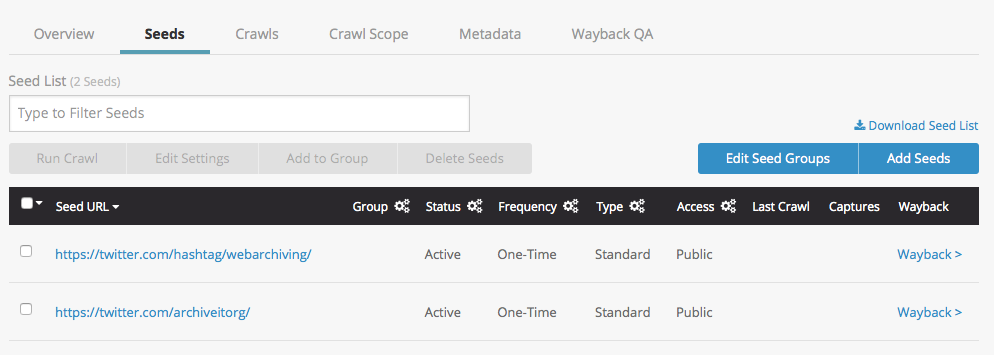
It's important to be specific when selecting your Twitter seeds. They can take the form of a specific user's feed like https://twitter.com/internetarchive/, a hashtag feed like https://twitter.com/hashtag/Webarchiving?src=hash/ or a specific search like https://twitter.com/search?q=web%20archiving&src=typd/.
Follow our standard guidance for adding seeds, and remember the following principles:
- Add an ending '/' to the url, for example: https://twitter.com/internetarchive/ (with an ending /). This will archive only the feed that you specify, rather than all of Twitter!
- Use the HTTPS protocol, not HTTP when formulating your seed.
- Do not add www to your Twitter seed. Twitter URLs do not have a www by default.
Scoping Twitter seeds
When a new Twitter seed is added to a collection, the default scope rules are automatically applied at the seed level. Older Twitter seeds can be updated by manually adding the following scope rules or following these instructions.
To learn more, please visit Sites with automated scoping rules.
Default scoping for Twitter seeds
By default, all new Twitter seeds as of May 14, 2019, have the following scope rules applied at the seed level to ensure that embedded images, icons, and glyphs are collected:
- Expand scope to include URL if it matches the SURT: http://(com,twimg,
- Ignore Robots.txt
If you see this kind of media missing from your earlier Twitter archives, apply the above scope rules manually and/or in bulk.
How to modify the scope of Twitter seeds
The proper formatting above enables our crawler to access Twitter feeds. To ensure that relevant content is collected, and to limit it from archiving content from outside the intended feed, apply the following optional scope modifications:
Exclude additional languages
For any tweet, the page is collected in all languages that the Twitter interface supports. For example, for each original tweet's URL archived in the following format...
https://twitter.com/[user name]/[tweet ID]/
...the following URLs are also archived:
https://twitter.com/[user name]/[tweet ID]/?lang=ko (Korean)
https://twitter.com/[user name]/[tweet ID]?lang=es (Spanish)
https://twitter.com/[user name]/[tweet ID]?lang=fr (French)
etc...
If you prefer to prevent multiple languages from being collected and replaying in Wayback, add a collection or seed-level scope rule to exclude document if matches the regular expression: ^.*lang=(?!en).*$
When this rule is added at the collection level, use twitter.com for the host.
You can adjust this regular expression to allow archiving in other languages by changing the language abbreviation in the parentheses. To archive only Spanish content, for instance, use ^.*lang=(?!es).*$
You will need to know the desired language abbreviation to use this rule. Be sure to run a test crawl after adding this regular expression.
Alternatively, if you want to collect more than one language, adjust the regular expression by following the format of this regex, which will archive in English and French: ^.*lang=(?!en|fr).*$
Links in Tweets
All links in tweets currently redirect through the Twitter URL shortener, https://t.co/. These links are out of scope by default, but can be scoped-in using the following rules.
To allow our crawler to access the actual pages and contents linked by a tweet, including all embedded files (such as images, CSS files, javascript files, etc.):
-
Expand the scope of your crawl, preferably at the seed level, to accept document if it contains the text: https://t.co/
- Ignore robots.txt blocks preferably at the seed level, or (as pictured below) at the collection level on the host: t.co
- Document limits allow you to specify how many t.co links off your target seed(s) you want to archive each time. This rule type must be added at the collection level. Try starting with a document limit of 200-500 documents on the host t.co.
- Data limits can also be added at the seed level to specify how much data you will allow t.co to add to your crawl. Try starting with a data limit of 1GB-2GB on the seed.
- Each seed and collection will be different; run a test crawl with the new rule(s) in place to make sure they are entered properly and you're collecting the content you want. You may need to adjust the limit(s) depending on the results.
Video
To collect all video content, ignore robots.txt blocks for the following host: video.twimg.com This isn't necessary if you ignored robots.txt at the seed level, which means that you will collect video content by default.
Running your crawl
After selecting your seeds and adding the recommended scope rules, run your crawl using Brozzler crawling technology.
What to expect from your archived Twitter feeds
Recent changes to the Twitter platform present multiple archiving challenges:
- As of August 2024, Archive-It can collect and replay Twitter feeds visible to non-logged-in users. This means recent captures may not include the latest tweets. Twitter feeds and hashtags are experiencing collection and replay issues.
- For individual tweets that contain video, video can sometimes be replayed through the Wayback banner.
For historic crawls, you may encounter the following issues:
- From October 2023 to August 2024,Twitter feeds and hashtags experienced collection and replay issues.
- Tweets and their inline images may display in archived feeds, but clicking an individual tweet to see its detail view may not replay, although this data may be collected. Check the twitter.com Host report for documents containing /status/ to see tweets whose detail views have been collected.
- Dynamically scrolling content on search pages may not be fully collected or replay in Wayback.
- Opening multiple Twitter pages at once can cause interference from browser cookies, resulting in an error message. We recommend limiting the number of Twitter captures open in a browser at the same time, and clearing Wayback cookies regularly.
Comments
0 comments
Please sign in to leave a comment.